
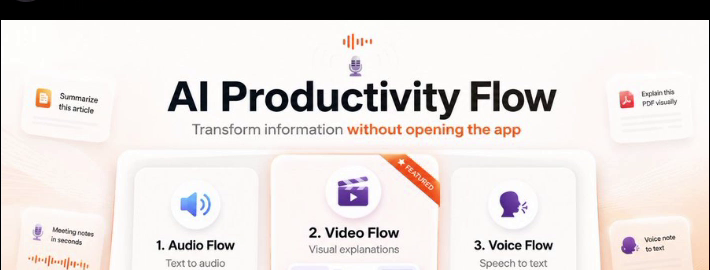
Desktop Intelligence • Video, Audio & Voice

Turn any document into video
And any text into audio

The Modern Workflow Crisis

Why work feels so exhausting

Knowledge work wasn’t meant to be 40 open browser tabs, constant eye strain, and typing until your wrists ache.

01 Eye Strain & Fatigue

The 15-Page Reading Wall

You spend hours every day hunched forward, squinting two inches from your monitor at dense technical docs, Slack essays, research papers, and PRs. Skimming causes you to miss critical details; reading word-for-word causes intense headaches and mental burnout.

74% of long documents are abandoned or skimmed without full comprehension
02 Context Switching

The Infinite Tab Labyrinth

Every existing AI tool forces you to leave what you're doing. You highlight text, copy it, open a browser, switch to ChatGPT or Claude, write a prompt, wait, and copy the answer back. Doing this 15 times a day completely shatters deep focus.

23 minutes lost to regain deep focus after every single interruption
03 Physical Bottleneck

Thinking at 150 WPM, Typing at 45

Your ideas move at conversational speed, but your keyboard slows you to a crawl. Typing emails, reports, documentation, and chat replies creates wrist fatigue (RSI) and a frustrating lag between your spontaneous thoughts and the screen.

3.6× slower to type by hand than to speak thoughts freely
Without Flow • The Straining Loop
⚠️ Step 01 • The 15-Page Reading Wall & Eye Strain
The AI Productivity Flow

Transform information without leaving your workflow

Stay relaxed, sip your coffee, and let Flow turn text into video, speech into text, and documents into voice.

With Flow • Effortless Clarity
🎬 Step 01 • Turn Any Document Into Video
01 Video Flow • Visual Synthesis

Turn Any Document Into Video

Highlight an article, PDF, tweet, or code repository, and Video Flow creates a crisp, narrated visual explainer in seconds. No browser tabs, no prompt gymnastics—just sit back with your coffee and watch complex ideas unfold visually.

02 Audio Flow • Eyes-Free Comprehension

Listen in Flow, Rest Your Eyes

Rest your eyes and absorb knowledge effortlessly. Instant Read Mode narrates with expressive human prosody, while Summary Mode delivers Short, Balanced, or Deep Dive overviews with speed control (0.75× – 2×) and seek controls.

03 Voice Flow • Zero-Friction Dictation

Speak at 145 WPM in Any Window

Press a shortcut in VS Code, Slack, Word, or Chrome and speak freely. Voice Flow cleans up filler words, structures sentences, and streams polished text straight to your active cursor. Completely private, running 100% locally on your machine.

The Actual Desktop App Demo

Experience Flow right on your screen

This is how Flow works in real life. Select text in Uzer Kayat's tweet below, or click any button to trigger Video Flow, Audio Flow, and Voice Flow.

Uzer Kayat on X: "AI Productivity Flow... ×
×
https://x.com/UzerKayat/status/2100164203139231923 🌐
🧩
🌤 29°C
🔍 Search
Flow
📶 🔊 🔋
ENG
IN
07:28 PM
16-09-2026
Providers

Your keys, your choice of model

Flow ships working out of the box with free local engines. Add your own keys when you want a better voice or a stronger model — they are stored locally and never sent anywhere except the provider you picked.

Speech to text

Local Whisper Nemotron on-device Google Gemini Groq Deepgram ElevenLabs OpenAI AssemblyAI Speechmatics NVIDIA NIM

Text to speech

Microsoft Edge Neural Windows SAPI5 offline Google Cloud TTS Gemini AI TTS ElevenLabs Deepgram Aura OpenAI TTS NVIDIA Riva Fish Audio

Language and video models

Built-in renderer Google NotebookLM Vertex AI Google Gemini Anthropic OpenAI OpenRouter Groq Together AI Cloudflare Workers AI NVIDIA NIM OpenCode Zen
Privacy

Built local-first. Private by default.

Your voice, documents, and keys stay on your hardware. Zero telemetry, zero logging.

Audio stays on your machine

Whisper transcribes speech directly on your device. Raw audio never leaves your computer.

Keys never leave your disk

API credentials are encrypted in local SQLite. No middleman proxies, zero telemetry.

Nothing is sent without asking

External AI models are only contacted when you explicitly choose to trigger a flow.

Direct Download

Get AI Productivity Flow

Install Flow directly on your desktop with a single click.

Download for Windows Windows 10 / 11 • 64-bit Installer
Download for Mac macOS 12+ • Universal App (.zip)
Mac Beta

AI Productivity Flow was built for Windows first and is now arriving on Mac. Core features work smoothly, but you might encounter a few rough edges as we finish polishing it. You can also install via Terminal using curl -fsSL https://raw.githubusercontent.com/uzerkayat2004-gif/AI-Productivity-Flow/main/scripts/install.sh | bash.